- Thursday, 11 June 2026

‘Accessibility tool icon’ integrated into all govt websites
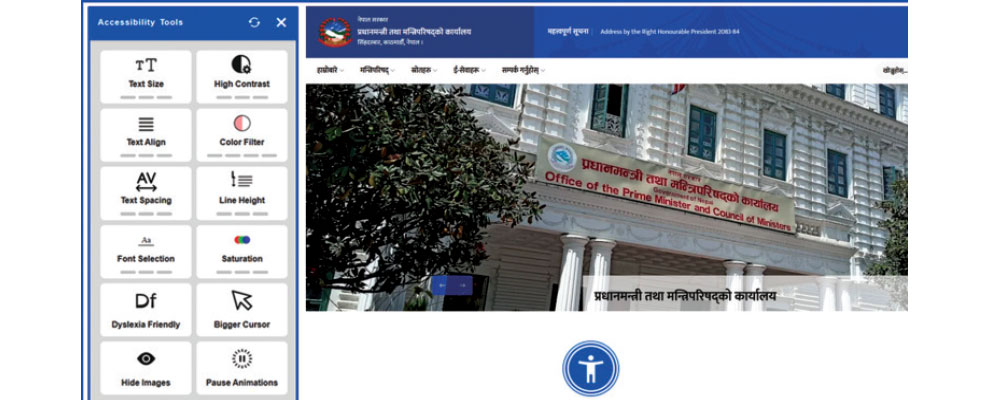

By A Staff Reporter,Kathmandu, June 11: Accessibility tools have been incorporated into the websites of all government agencies to make digital services easier to use and more inclusive for all citizens, according to the Department of Information Technology.
Information officer Prakash Dawadi for the Department said the tools have been introduced to ensure that government websites are user-friendly for everyone.
According to him, the feature is designed to support users with visual impairments, low vision, colour vision deficiencies, learning difficulties, senior citizens, and persons with special needs, enabling them to access government web content more easily.
The government has implemented this system to ensure equal access to digital services and to strengthen the right of persons with disabilities to obtain information.
At present, after opening a government website, users can find an ‘accessibility tool icon’ at the lower centre of the page. This feature allows users to adjust the website’s appearance and content according to their individual needs.
“Users can easily increase or decrease text size, and enhance the contrast between text and background to improve readability,” Dawadi said. “It also includes options such as different colour filters, adjusting spacing between letters and lines, and selecting fonts.”
He added that to further improve usability, the tools also allow users to enlarge or reduce the mouse cursor, hide all images to enable text-only reading, and disable animations and moving visuals. According to the Department, these websites have been developed in line with the international Web Content Accessibility Guidelines (WCAG) and can also be navigated using only a keyboard.
A ‘skip navigation’ link available on government websites helps keyboard and screen-reader users jump directly to the main content. Additionally, alternative text (alt text) attached to important images, logos and service-related visuals makes it easier for visually impaired users to understand the content.
Similarly, error messages and instructions in online forms are designed to be clearly readable and compatible with screen readers.
“Search and contact form input fields have clear labels and indicators, making it easier for screen-reader users,” Dawadi said. “Keyboard users can also clearly identify where they are on the page at any time.”